> For the complete documentation index, see [llms.txt](https://docs.tensorleap.ai/llms.txt). Markdown versions of documentation pages are available by appending `.md` to page URLs; this page is available as [Markdown](https://docs.tensorleap.ai/user-interface/project/network/network-mapping/create-a-mapping-deprecated/visualizer-node.md).
# Visualizer Node
Visualize model graph tensors using Visualizers
Neural networks are made up of components that process generic, undefined data. In order to make sense of the data, Tensorleap enables you to visualize the data contained in any node, using a **Visualizer** node. You can visualize the input(s), output(s) (prediction), ground truth(s), and intermediate tensors.
These visualization would be present at multiple segments of the [Dashboard](/user-interface/dashboards.md) view.
When performing [**Sample Analysis**](/user-interface/dashboards/dashlets/sample-analysis.md#sample-analysis), error analysis algorithms analyze the sample's error throughout the model and project it to each input. This will generate various heat-maps highlighting different features. Therefore, at least one connection of the [**Dataset Node**](/user-interface/project/network/network-mapping/create-a-mapping-deprecated/input-node.md) (model-graph input) must be connected to a **Visualizer**.
You can write your own **Custom Visualizers** in the **Integration Script** (see [custom visualizers](/tensorleap-integration/python-api/code_loader/visualizer_classes.md)), or use one of the following out-of-the-box Decoders:
* **HorizontalBar** - visualize numeric data as horizontal bar with labels
* **Image** - visualize 2D image
* **Video -** visualize 3D data
* **Graph** - visualize numeric data as a graph
* **Raw data** - presents the raw data as is
* **Text** - tokens representation of text (for *token-to-text* **Visualizer**, use the [**Decoder Function**](/tensorleap-integration/writing-integration-code/visualizer-function.md) with your tokenizer)
* **ImageMask** - visualize an image and an overlay mask (commonly used in image segmentation)
* **TextMask** - visualize text and an overlay mask (commonly used in text segmentation)
{% hint style="success" %}
It is highly recommended to use your own custom visualizers in the [integration script](/tensorleap-integration/writing-integration-code.md). This would allow you to test results in your[ local development environment](/tensorleap-integration/integration-test.md) before you upload the model to Tensorleap. This helps to ensure the visualized results are as you would have expected, and to quickly adjust any normalizations, conversion, and display settings.
{% endhint %}
{% hint style="info" %}
Adding a custom visualization is only possible after registering it in the [integration script](/tensorleap-integration/writing-integration-code.md) and parsing it successfully through the system. To make sure you can add your visualizer ensure that the correct [code integration](/user-interface/project/network/code-integration.md) that defines your loss is registered in the system.
{% endhint %}
### Custom Visualizer Example
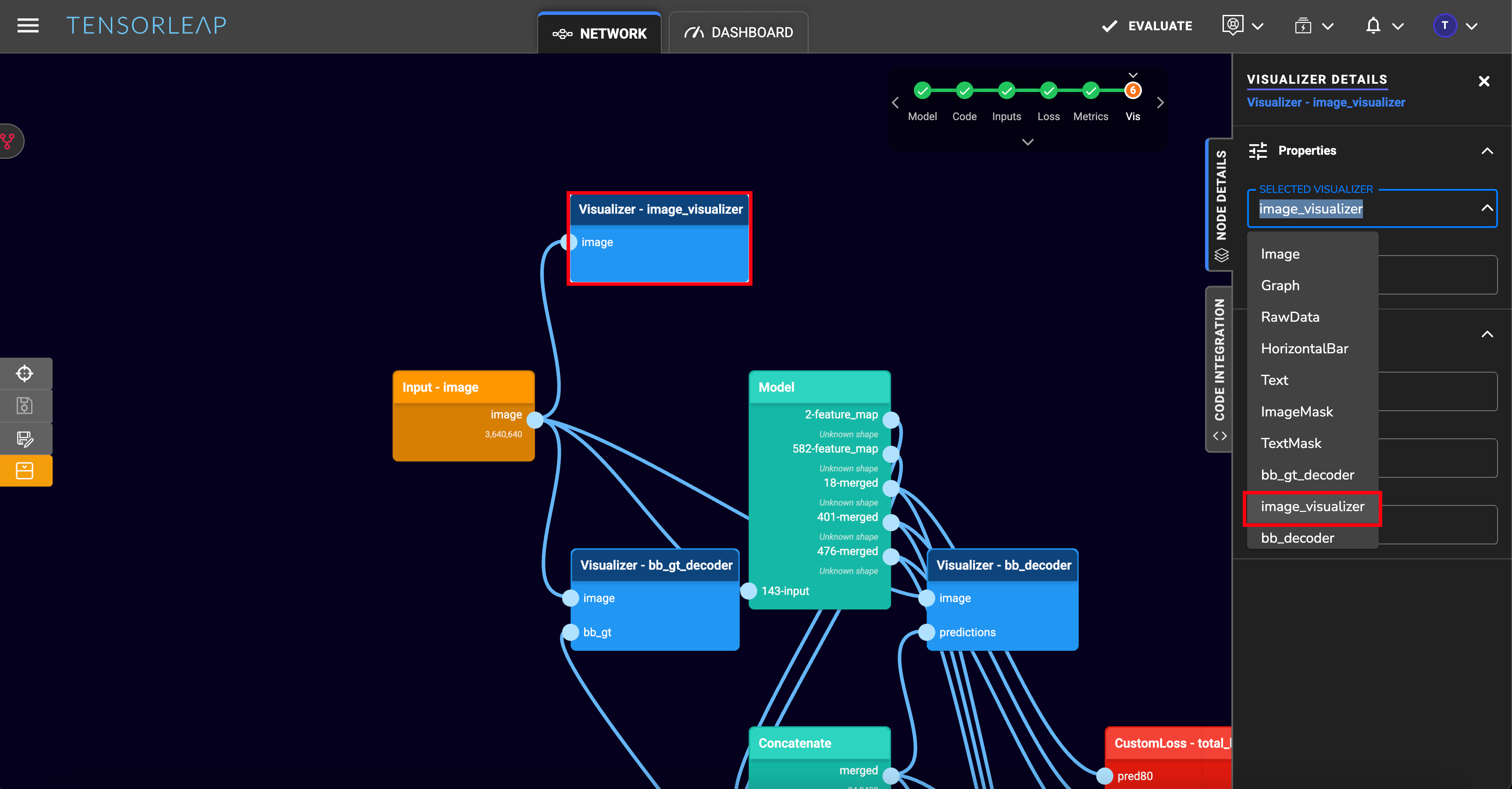
Adding the following custom visualizer in the script:
```python
@tensorleap_custom_visualizer('image_visualizer', LeapDataType.Image)
def image_visualizer(image: np.ndarray) -> LeapImage:
image = rescale_min_max(image.squeeze(0))
return LeapImage(image.transpose(1,2,0))
```
Would add the following option in the visualizer selection dropdown menu:
To add a visualizer, select visualizer when [adding nodes](/user-interface/project/network/network-mapping/create-a-mapping-deprecated.md#adding-nodes) to the mapping. This visualizer would have the same arguments as your [custom visualizer](/tensorleap-integration/writing-integration-code/visualizer-function.md) defined in your [integration script](/tensorleap-integration/writing-integration-code.md) in the case of a custom visualizer.
## Setup
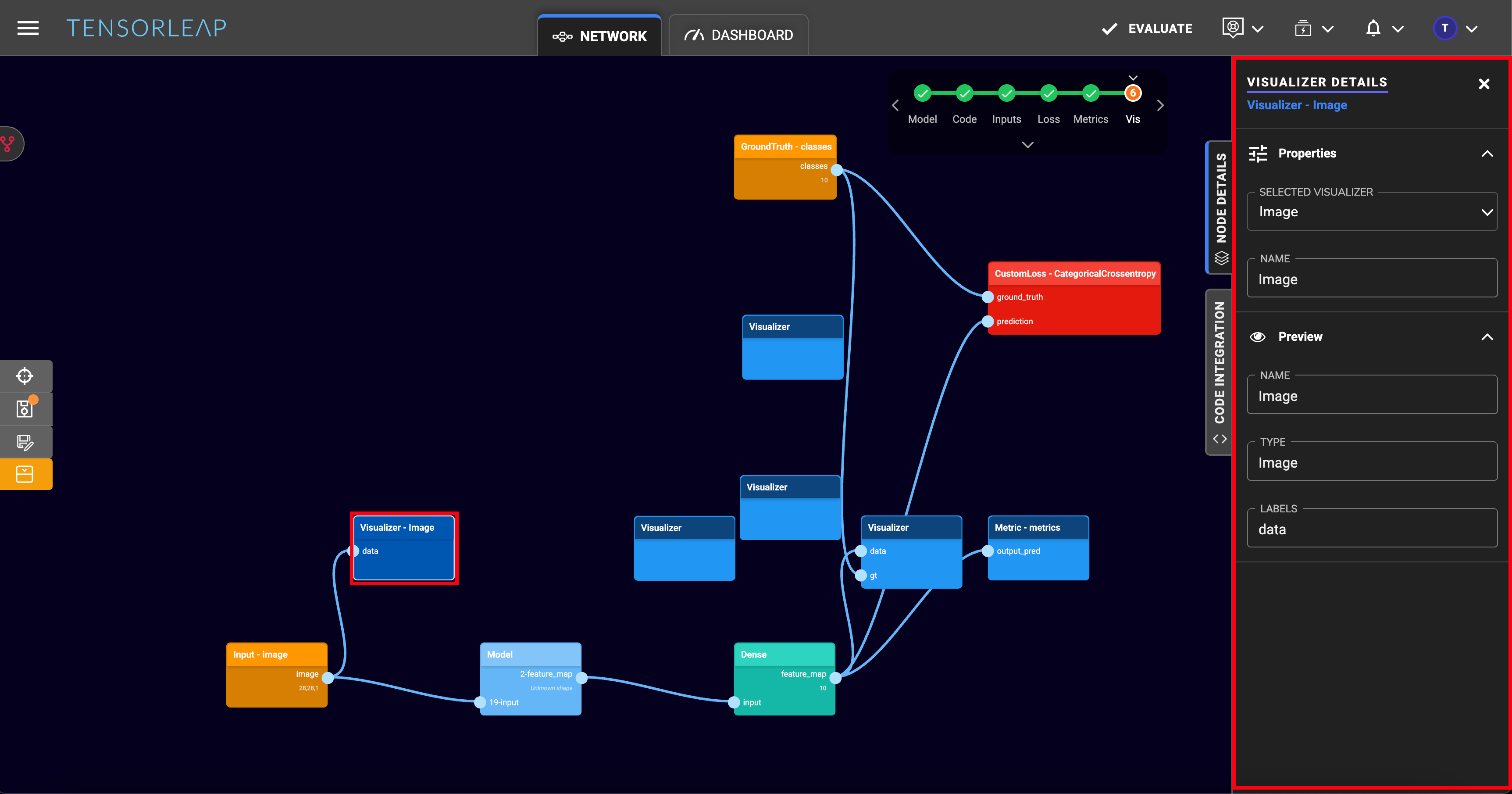
Visualizer Node and its properties
The **Visualizer** node have several properties:
* **Selected Visualizer**: a dropdown from which a custom or default visualizer can be selected. The list would include all registered [custom visualizers](/tensorleap-integration/writing-integration-code/visualizer-function.md) from your [integration script](/tensorleap-integration/writing-integration-code.md).
* **Name**: The name of the selected visualizer.
* **Type:** They [type](/tensorleap-integration/python-api/code_loader/visualizer_classes.md) of the selected visualizer.
* **Labels**: The expected arguments for your visualizer.
---
# Agent Instructions
This documentation is published with GitBook. GitBook is the documentation platform designed so that both humans and AI agents can read, navigate, and reason over technical content effectively. Learn more at gitbook.com.
## Querying This Documentation
If you need additional information that is not directly available in this page, you can query the documentation by asking a question.
Perform an HTTP GET request on the following URL with the `ask` and `goal` query parameters:
```
GET https://docs.tensorleap.ai/user-interface/project/network/network-mapping/create-a-mapping-deprecated/visualizer-node.md?ask=&goal=
```
`ask` is the immediate question: it should be specific, self-contained, and written in natural language.
`goal` is what the user is ultimately trying to achieve, the reason they need the answer. Sharing it helps GitBook give you a better, more relevant answer. A goal is most helpful when it describes the outcome the user wants rather than restating the question. For example, with `ask=how do I create an API token`, a goal like `automate deployments from our CI pipeline` lets GitBook tailor the answer to that use case.
The response will contain a direct answer to the question and relevant excerpts and sources from the documentation.
Use this mechanism when the answer is not explicitly present in the current page, you need clarification or additional context, or you want to retrieve related documentation sections.